My terminal only code review workflow
A Terminal Only Code Review Workflow with herdr, lazygit, delta, fzf, and nvim
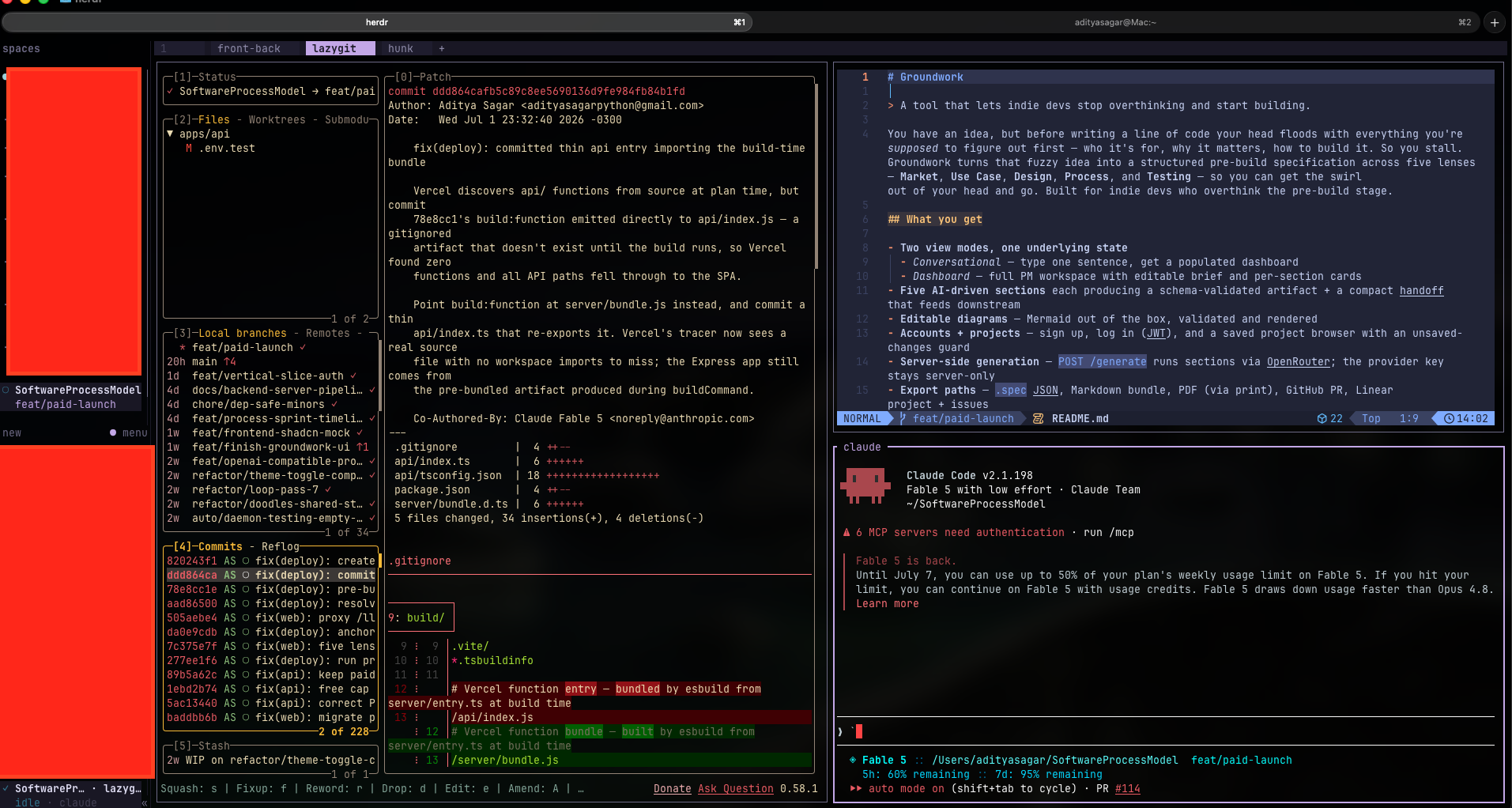
I review code all day, my own branches before an MR, teammates' commits, QA fixes, and lately a steady stream of diffs produced by AI agents. Suppose an agent finishes a fix at 11pm and I want to know if it is actually shippable, earlier that meant opening the GitLab web UI, clicking through files, then switching to my editor to change anything. Now the whole loop lives in the terminal, and honestly it is faster than anything browser based.
The stack#
| Tool | Role |
|---|---|
| herdr | Agent aware terminal multiplexer, panes, tabs, and workspaces, plus live status for the AI agents running in them |
| lazygit | TUI(terminal user interface) for git, staging, branches, commit browsing |
| delta | Diff pager that adds syntax highlighting and line numbers to every diff |
| fzf | Fuzzy finder, powers an interactive commit picker |
| nvim | Editor, launched straight from lazygit at the exact line I'm looking at |
| Claude Code | AI coding agent, several sessions of it, running in parallel across herdr panes |
Everything is wired together with a small lazygit config and one block in .zshrc, that's it.
The glue#
lazygit to delta to nvim#
~/.config/lazygit/config.yml tells lazygit to render every diff through delta and to open files in nvim:
git:
  pagers:
    - colorArg: always
      pager: delta --dark --paging=never --line-numbers
os:
  edit: "nvim {{filename}}"
  editAtLine: "nvim +{{line}} {{filename}}"
The --line-numbers flag matters more than it sounds, you get a gutter with the old file number on the left and the new file number on the right, so I always know exactly where I am in the file.
One macOS gotcha, lazygit reads its config from ~/Library/Application Support/lazygit/, not ~/.config/lazygit/, a symlink keeps one canonical file and both paths happy.
The commits picker#
A shell function that turns git log into an interactive browser:
commits() {
  local sha
  while sha=$(git log --oneline --color=always -50 \
      | fzf --ansi --reverse \
            --preview 'git show --stat --format=fuller --color=always {1}' \
      | awk '{print $1}') && [ -n "$sha" ]; do
    git show "$sha"
  done
}
Type commits, fuzzy search the last 50 commits, the full message and file stats sit in the preview pane, hit Enter to open one. It loops back to the picker when you are done, Esc exits.
Branch aware diff aliases#
_git_default_branch() {
  git symbolic-ref --short refs/remotes/origin/HEAD 2>/dev/null | sed 's|^origin/||' \
    || { git show-ref -q refs/heads/main && echo main; } \
    || { git show-ref -q refs/heads/master && echo master; }
}
The trick here is that my work repo's trunk is prerelease, not main or master, so hardcoding a branch name would give me wrong diffs in the repo I use the most. Instead the helper asks the remote what its HEAD branch is at runtime, so a "diff my whole branch against trunk" alias works in every repo I touch.
The multiplexer: herdr#
Everything above runs inside herdr, think tmux but agent aware. It gives me panes, tabs, and persistent sessions like tmux would, but each pane running an AI agent shows a live status, working, idle, blocked, done. One glance at the pane bar tells me which session needs my attention, no cycling through panes hoping to catch the one that stalled.
That status awareness is what makes running multiple Claude Code sessions in parallel practical instead of chaotic. A typical layout is one workspace per task, lazygit and nvim in one pane, a Claude Code session in another, and background sessions herded in their own tabs.
The AI workflow: worktrees for the trivial, local for the focus#
The split that keeps me sane:
- Trivial tasks go to git worktrees(a second checkout of the repo sharing the same history). Small fixes, QA bounce backs, mechanical refactors, these get dispatched to a Claude Code session running in its own isolated worktree. Each worktree gets its own ports and env, so several run at once without stepping on each other, herdr shows me when one goes idle or gets blocked, and I context switch in only to review, with lazygit and delta naturally.
- Features stay on the local checkout, with my full attention. Anything that needs real design thinking happens in the main checkout, one Claude Code session, me in the loop on every step. No parallelism here, focus is the point.
Review is the common exit path for both. Whatever an agent produced, I read it as a syntax highlighted, line numbered diff in lazygit and press e to take over in nvim whenever I want to change something myself.
The daily loop#
lazygit, press4to jump to the Commits panel,j/kto scroll.- Enter on a commit drills into its files, Enter again shows the file's diff, syntax highlighted and line numbered via delta.
eon any file opens it in nvim at that exact line. Fix, save, quit, and I am back in lazygit. This is the killer feature, reading a diff and editing the code are one keystroke apart.commitsin any shell when I just want to hunt for a commit by message.
What I learned#
- The pager is the review experience. Swapping lazygit's default diff for delta was the single biggest upgrade, syntax highlighting and line numbers turn scanning a patch into actually reading code.
- Fewer tools, better wired. I originally added a standalone diff viewer(hunk) to the stack, then dropped it, delta inside lazygit already gave me highlighted diffs and the
eto edit flow gave me the independence I wanted. The best workflow change was subtraction. This won't replace a proper MR review with a teammate, but for the daily read and fix loop it covers almost everything. - Detect, don't hardcode. Runtime default branch detection made one alias portable across every repo, including ones with unconventional trunk names.
- Parallelism needs visibility. Running agents in parallel only works if you can see their state at a glance, that is the whole reason the multiplexer is agent aware.
References#
- herdr, agent aware terminal multiplexer (GitHub)
- lazygit, terminal UI for git
- delta, syntax highlighting git pager
- fzf, command line fuzzy finder
- Neovim, the editor
- Claude Code, AI coding agent
- git worktrees, multiple checkouts of one repo